

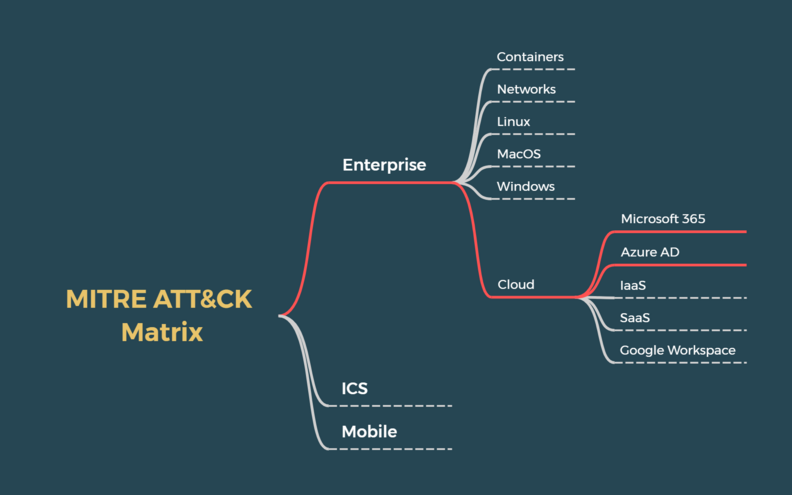
Common attacks targeting Microsoft 365 and Entra ID (formerly Azure AD)
Attacking cloud platforms can take many forms and each attackers have their own motives, could it be financial or intelligence gathering (industrial spying, nation state sponsored groups). With Entra ID (formerly Azure AD) and Microsoft 365, attacks can have many different paths, from phishing, the most exploited vector1 or a pivot from an on-premises environment as Solorigate showed it to us in 2020. Ultimately we can note a goal that relates to obtaining an access to M365/Entra ID and underlying data.
When looking at the Mitre Office 365 Matrix2, how do you translate the TTPs to an operational view of Entra ID and Microsoft 365 ?
The matrix below aim to reference know attacks and vectors linked to Microsoft from experience or community reports and feedbacks. Although, this article won't go into details of each attacks as it will be more interesting, for me, to presents investigations or specific tools with dedicated articles in the future on this blog ;)
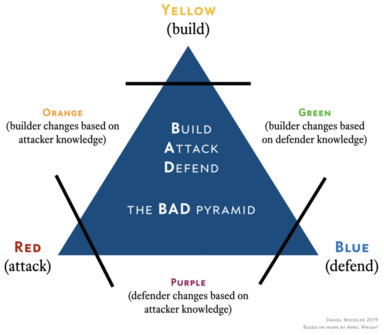
As mentioned in my previous article, Microsoft 365 and Azure, getting your hand onto cloud practice is the best way to better understand the ins and outs, especially in the constantly shifting world that is public Cloud. As part of the BAD (Build, Attack & Defend) pyramid3, red teamers, blue teamers, purple teamers and more globally IT teams can benefit from each other knowledge.
Regarding cloud, it is harder to get yourself a grip on resources like a tenant or licences without breaking the bank and not all organizations may not dispose of sufficient licences or control on their cloud platforms.
Therefore, it is important to better understand the context of attacks and what can be targeted on Microsoft 365 and Entra ID, hence I've decided to work on this matrix below.
M365 and Entra ID Attack matrix
disclaimer
This matrix can be updated in the future as new attacks may emerge or previous exploitation paths may be addressed by Microsoft.
Analysis
About this analysis
I won't go in details regarding each techniques, especially if some of them can speak for themselves.
Some can be the subject of dedicated articles. If there any points worth mentioning or an inconsistencies, feel free to reach me on linkedin or on twitter.
For an outsider, the reconnaissance phase regarding Microsoft 365 is quite trivial.
To verify if a domain is associated with an existing domain, nothing easier than checking the MX or through Azure public API like OpenID Connect (OIDC) discovery endpoint :
https://login.microsoftonline.com/<domain>/.well-known/openid-configurationor for the laziest of us, you can check out the website :
https://www.whatismytenantid.com/You can also find more public information related to users, but I won't jump into the details as this is already nicely explained on aadinternals.com.
Side note regarding the enumeration through the URL below:
https://login.microsoftonline.com/common/GetCredentialTypeIf a domain is federated using an ADFS or any other IdP like Ping Identity and so on, it will give false positive using the above endpoint and won't allow a proper enumeration. Sadly if this is the case, you'll miss out the opportunity to enumerate guests accounts.
In this situation, You can still collect Login information. This will allow to validate if the domain is federated or not (managed).
https://login.microsoftonline.com/getuserrealm.srf/?login=$DOMAIN&xml=1If federated, this will give information regarding the authentication type and the login URL, always useful to plan the next step in an attack.
If we go back to our sheep, an attacker can use 5 endpoints, so far, to enumerate about his target :
- autologon aka SSO
- oauth2 (default), works with federated domain
- office, for Managed user domain only
- onedrive, works with federated domain
- rst, Sharepoint Online authentication
You can check out O365spray by 0xZDH on github to go further if you like.
There isn't much you can about this, but it is going to be more interesting as we move forward along the Microsoft 365 kill chain. The next steps are where you'll have control and may be able to harden your configuration to better protect your users and data or protect your data from your users, the famous layer 8.
Anyway, it is true that the attacker is required to pass through the authentication process, so this behavior is by design and won't change anytime soon. Regarding ADFS, a dedicated article for hardening is planned later ;).

Getting an access onto the targeted tenant is the goal of any attackers. For this purpose, you may have already seen attempts from outsiders to compromise an employee accounts, in some other case, the compromission of an Entra ID guest account, especially in the case Managed Cloud Services Providers or a pivot from your on-premise environment, like solorigate has shown us.
Bruteforcing and credentials stuffing :
- Legacy protocols have been disabled as of december, 31st 2022 on all Microsoft 365 tenants. Although, SMTP is still enable on tenants that where still using it, like for old printers and so on. As of today, the following endpoints can be used for password spray or credential stuffing :
- Exchange Online
- Active Sync
- Autodiscover
- SMTP basic auth(if enabled)
- ADFS
- Entra ID Seamless SSO
- OAuth2.0
- RST
- Exchange Online
- Regarding Office 365 reporting url, reports.office365.com, basic auth is being deprecated by Microsoft.
- The spray didn't disappear with basic auth, it moved to the ROPC flow (Resource Owner Password Credentials) of modern authentication: password only, and no MFA if Conditional Access doesn't require it.
Disclaimer
Such attack may result with the blocking of the IP address used.
Spearphishing and related techniques:
- Usually, a malicious link is sent and the user gives away his credentials
- To bypass url detonation, attackers often use a two stage phishing
- A first link hosted on a file sharing platform like adobe or even a compromised OneDrive
- The link to the malicious form
- To bypass url detonation, attackers often use a two stage phishing
- Some other techniques include :
- Device authentication code. This integration of OAuth2.0 Device Authorisation Grant allows an attacker to collect a legitimate access token. You can read more about it on aadinternals.
- This flow is made for devices without a keyboard or a browser (TV, printers, CLI tools): the device displays a code and the user enters it on microsoft.com/devicelogin from another device.
- Here, the attacker requests the code himself to Microsoft using a legitimate first-party client ID (Microsoft Office for instance) and send it to the victim. The victim enters the code on the real Microsoft page and performs the MFA himself, so nothing looks wrong to him. Meanwhile, the attacker polls the token endpoint and receives an access token and a refresh token.
- The code is only valid 15 minutes, this is why the recent kits generate it when the victim loads the phishing page and not when the email is sent.
- Since 2025, it is massively used: Storm-2372 campaigns6, then phishing-as-a-service kits in 2026. Sekoia published an analysis of EvilTokens7 in March: the kit uses the Microsoft Office client ID, then automatically uses the refresh token to register a device in Entra ID and request a Primary Refresh Token (PRT). From there, it generates SSO cookies for the browser and Outlook Web, and runs Graph queries to enumerate users, groups, applications and roles. A webmail interface and BEC features are provided to the affiliates.
- In the sign-in logs, these connections show deviceCode as authentication protocol, which is rarely legitimate for a standard user.
- With the deprecation of basic authentication within Exchange Online, new phishing technics have emerged like obtaining a valid session cookie with what we call an AiTM (Attacker in The Middle) phishing.
- The victim receive a link to a website that proxy a web session between the user and Microsoft services. The goal of this attack is to bypass the initial authentication by stealing a session cookie.
- Applications and websites today rely on session tracking through a cookie. This allows the user to avoid having to re-authenticate every time they visit a page. In order to obtain this proof, the user must first log into an authentication service, Entra ID as part of Microsoft 365. Moreover, Entra ID integrates MFA in order to protect identities and access to Microsoft 365 resources (Exchange Online, SharePoint, etc.)
- MFA claim is usually present in this cookie so it won't ask for the current session.
- The phishing site therefore has two TLS sessions, one with the user and the other with the targeted Microsoft services. These two sessions allow the attacker to intercept the entire authentication process of the user and the sensitive information in the http requests (password, cookie, etc.)
- Microsoft published an interesting article with some more explanation. You can access it there : From cookie theft to BEC: Attackers use AiTM phishing sites as entry point to further financial fraud
- On Entra ID, the cookies of interest are ESTSAUTH and ESTSAUTHPERSISTENT on login.microsoftonline.com. Once imported in his browser, the attacker is logged in as the victim without being asked for the password or the MFA again.
- Open source tools like Evilginx made this easy to setup, and AiTM is now sold as a service (PhaaS) with kits like Tycoon 2FA or Mamba 2FA: no technical skills needed anymore.
- Only phishing-resistant methods (FIDO2 keys, passkeys, Windows Hello for Business) break this attack, as the authentication is bound to the domain: on the proxy domain, the key simply doesn't answer. Push notifications, OTP and even number matching are relayed without problem.
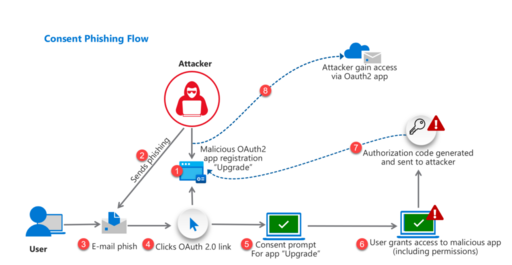
- The creation of a malicous OAuth application in Entra ID allows a persistent access to a user underlying data (mail, Onedrive and Sharepoint) using token. This simply works by tricking the user to consent to a third party application. Afterward, the application can then signin as the victim as this method does not requires to know a victim password.
- Teams vishing and direct contact: by default, Teams external access allows any user from any other tenant to chat or call your users.
- The scenario documented by Microsoft with Storm-1811 (Black Basta ransomware) in 20248 starts with an email bombing, the victim is subscribed to thousands of newsletters. Then the attacker contacts him through Teams from a tenant he created, with a display name like "Help Desk" or "IT Support", sometimes followed by a call.
- The victim is asked to open Quick Assist (or AnyDesk and others) to "fix the problem" and gives a remote access to the attacker. It has been widely reused by other groups since.
- Here, the M365 account is not the first target, it lands directly on the endpoint, with the user session and tokens that comes with it.
- Device authentication code. This integration of OAuth2.0 Device Authorisation Grant allows an attacker to collect a legitimate access token. You can read more about it on aadinternals.
Pivoting from on-premise environment :
As a first step, you may read Microsoft documentation regarding Hybrid Identities and which one can best suit the needs of an organization.
- GoldenSAML
- With the compromission of the Federation token signin certificate from an ADFS server, an attacker could forge valid SAML token and therefore login as anyone (On-premise synced users or by adding immutableID to a cloud only accounts), without even needing MFA.
- Abusing PTA, Pass Through Authentication :
-
Pass-through authentication sync identities only on Entra ID and authentications are handled by a PTA agent, available with Entra Connect or as standalone. This mecanism make the local Active Directory as the handler of any authentications attempts.
-
Attackers can backdoor this service and be able to :
- Accept any passwords
- Dump password as cleartext
-
- Active Directory and Seamless SSO (Silver ticket) :
- Here, the same concepts as with ADFS and GoldenSAML can be applied. Seamless SSO, known as Desktop SSO aswell, allows the authentication on Entra ID using Kerberos tickets. If the password of this account is known, then an attacker can forge Kerberos for any synced users.
- It is also possible to target cloud only accounts by setting a SID. Though, this exploit vector can only target non admin accounts now.
- Abusing Entra Connect (formerly AD Connect) 9 and Password-Hash sync :
- Attacker can target the Entra Connect database and dump the password of the MSOL_* account. This account could then be used to perform a DCsync attack.
- Password-hash synchronization allows a user to login to Active Directory and Entra ID using the same password.
- There is an article that goes through these methods in length on aadinternals.com. I recommend to check it out.
Valid accounts and external identities:
- Valid account consist of using previously compromised user, password reuse or weak password. When the access is protected by MFA, we observe MFA fatigue or MFA Bombing to push the user to accept the MFA request.
- Since number matching is enforced in Microsoft Authenticator (2023), MFA fatigue works much less, which is why attackers moved to AiTM and device code phishing.
- Managed services providers could also be targeted and compromised to pivot to the target tenant, usually they can either be cloud-only account or sync from an Active Directory.
Usually, and especially with spearphishing and BEC (Business Email Compromise), attackers rely on internal phishing to obtain access to valuable account.
For this, either an attacker can target a few specific accounts looking for elevated rights or roles within the company (accountants, managing director) or target users with the directory as a whole, but it is not really discreet and is not a behavior related to persisting threats.
At the same Time and to escape either detection or suspicions from end users, OneDrive or Sharepoint could be used once the account has been compromised to share malicious content like a form stealing credentials or request a consent to a malicious app.
Teams is now used the same way as email for internal phishing, with a better click rate.
Attackers can perform discovery within a tenant to identify accounts, roles, groups or application that could help them achieve their goal. Although some parts are dependant of the administrator role they could to enumerate conditionnal access policies and more.
This phase often leads to actions or the setup of a persistence mecanism within the tenant.
One interesting point is content search on Microsoft 365. This can be used to expose sensitive information such as clear text credentials or specific documents. For this, if an attacker has the appropriate roles within Microsoft Purview (purview.microsoft.com), he can always use the content search with specific filters.
Another way is too look for contents on Sharepoint Online for which a user has access to it. If you have done red team engagement within Active Directory, you probably heard about snaffler but what if the same tool was available for Sharepoint Online ? The answer is yes with SnaffPoint, you can check it out on github
With Microsoft 365 Copilot, an attacker doesn't even need a tool: asking "find the documents with passwords" or "summarize the emails about the next payment" gives the result in seconds, with the rights of the victim.
This phase aim to identify the technics and procedures attacker can employ to achieve their objectives.
Could it aim to persist and looking for the privileges to do so or simply commit his fraud, so let's review these TTPs.
Privileges escalation :
- Entra ID roles and abusing service principals10 :
-
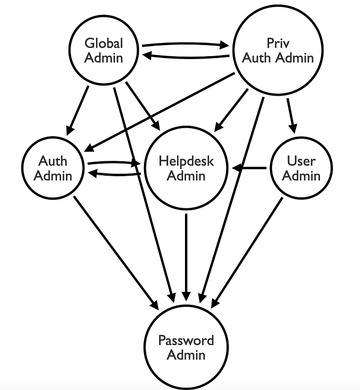
Privileges escalation from Entra ID roles is limited as only Global Administrators and Privileged Authentication Administrators can reset password of another Global Administrator. This limit possible attack path through roles.
-
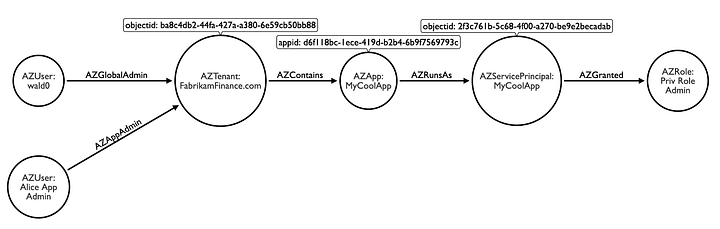
Entra ID application :
- An Entra ID application (App registration) is the object holding the settings of the applications. A Service Principals act as the identity object, allowing consent on resources within the tenant.
- In the case of an application, the owner or an application administrator can elevate their privileges by impersonating the associated service principal and leveraging any privileged assigned application role
-
- Dynamic groups :
- This functionnality grant administrators to perform automatic group assignements based on attributes.
- If the dynamic membership rule is not properly define for a privileged group, an attacker may update attributes on a controlled account to match the defined criterias.
- Active Directory Synced group :
- Security groups can be synced from Active Directory and associated with roles within the tenant. Tese groups are not always classified as sensitive within Active Directory, it allows to elevate Microsoft 365 and Entra ID privileges by adding an attacker controlled account within these groups.
Databreach :
- Exfiltration :
- Exfiltrating data can take many forms as an attacker can interact with a compromised mailbox and sharepoint online site and a user personal Onedrive.
- An autoforwarding rule can be set (smtp transfer, inbox rule), the content can be downloaded on an external device or shared links created.
- With an LLM to sort the content, the volume changed: thousands of emails read through Microsoft Graph in minutes, in batches, and only the useful ones are kept (invoices, bank details, passwords).
Defense evasion :
- To avoid suspicion, especially if a compromised mailbox is used for spearphishing or fraud, we often observe the creation of a mailbox rule to automatically hide or delete future emails.
- Once an account is compromised through phishings, an attacker can perform a hard delete of emails from the user mailbox. This is an attempts to hide the original vector.
- License downgrade can be exploited to reduce the monitoring capabilities. In Microsoft 365, this can be translated with the removal of licenses that offer access to Defender for Cloud Apps or Entra ID P1/P2 (formerly Azure AD Premium) plan.
- Disabling the mailbox audit or breaking the export of the logs to the SIEM (diagnostic settings) is another way to blind the defender.
Fraud :
- Attacker often look for sensitive documents like bills or tax invoice in an attempt to commit fraud. They can forge false invoice that can be sent to to the treasury or to a partner in charge of payments.
- Today, the email is written by an LLM, in the language and the tone of the victim, which makes it much harder to spot.
Bypassing Security controls :
- Application registration :
- Application offers access to API like Microsoft Graph. It is used by an attacker to keep a read and write access on behalf of users (email, OneDrive/SharepointOnline).
- Entra ID device join :
- Conditionnal access or other security checks (CASB) can require devices to be marked as compliant to access applications or Microsoft 365 services. By enrolling a device owned by the attacker, it can receive the compliance policies and be marked as compliant accordingly.
- Registering a device also gives the attacker a Primary Refresh Token (PRT), which survives the password reset and the session revocation. Only deleting the device kills it.
- MFA Settings can be modified to add a phone number or an authenticator app to generate OTP. It offers autonomy and helps to legitimize the connections. On the administration part and if per user MFA is enabled on tenant, an attacker can add his own IP range as a trusted location.
- Conditionnal Access can be updated by an attacker if he possess a role like Security Administrator. To bypass further conditionnal access checks, it is possible to add a trusted location, exclude a user, a group or an application.
Identity and Access :
- Service Principals :
- An attacker can either create a service principal or update an existing one to allow a backdoor access through API.
- Golden SAML and domain Federation :
- As explained before, Golden SAML grant an attacker the right to authenticate as any sync-user on Entra ID.
- The same concept can be exploited by an attacker. A "federated domain" is added to the target tenant and this backdoor grant a persistence as it is possible to generate a valid token for any user thanks to the ImmutableID.
- Seamless SSO, aka Silver ticket can be used to persist an access to a tenant by compromising the PTA agent. This attack has been refered aswell in the Initial Access tab ;).
- Cross-tenant synchronization (CTS) :
- CTS is made for multi-tenant organizations (subsidiaries, mergers). A source tenant pushes its users into a target tenant as B2B users, through a provisioning job, the same way it's done with SaaS applications. On the target tenant, it is allowed in the Cross-tenant access settings of the partner organization with two inbound settings: Allow users sync into this tenant and Automatically redeem invitations, so the users don't even get a consent prompt.
- With a Security Administrator or Global Administrator role in the victim tenant, an attacker adds his own tenant as a partner organization and enables these two settings. From then on, he can create a user in his tenant and sync it into the victim tenant whenever he wants, without signing in the victim tenant again.
- By default, synced users are created with the Member userType and not Guest, so they get the same default rights as an employee in the directory.
- Deleting the synced accounts is not enough, they will come back as long as the partner configuration exists.
- Vectra published this technique in 2023 with a PoC in MAAD-AF11. The same feature can be used for lateral movement: if the compromised tenant already has an outbound sync to another tenant, adding the compromised user to the scope of the sync job gives him an account in the other tenant.
- AI agents and connectors :
- At the end, an agent is a non-human identity holding permissions and tokens, so the same ideas as with OAuth applications and Power Automate apply. The difference is that these objects are recent, created by business users and rarely included in access reviews.
- Copilot Studio agents can use tools and connectors (Outlook, SharePoint, Dataverse, HTTP requests, Power Automate flows) authenticated with the maker credentials: the agent acts as the user who created it, whoever talks to it. Both options are allowed by default12. An attacker with a compromised account can create such an agent and share it, or publish it with no authentication, to keep an access to the victim data that doesn't rely on his sign-in. Zenity showed at Black Hat 2024 that many agents were exposed this way on internet and could be found and queried by anyone13.
- Agents can also be triggered by events (new email, new file, schedule) and run in the background with the maker credentials, which is the same idea as the Power Automate flows described below.
- Connectors and MCP servers added to an agent are consents and stored tokens as well. A connector pointing to a server controlled by the attacker is an exit door for the data handled by the agent.
- Agents can also be the wrapper of the attack: with CoPhish14, Datadog showed an agent hosted on copilotstudio.microsoft.com with its sign-in topic modified to display a malicious OAuth consent and send the token to the attacker.
- Since Entra Agent ID, agents have their own identities in Entra ID, built on top of service principals. Silverfort showed in 2026 that the Agent ID Administrator role could become owner of any service principal and add credentials to it, including one with the Global Administrator role15. It is patched now, but adding credentials to an agent identity remains the same backdoor as with service principals.
Email :
- Mailbox delegation can be leveraged to access another mailbox content or to send mail as.
- Mailflow rules, also known as transport rules, works both ways (internal and external) for any emails transiting through Exchange Online. These rules affect the flow of emails before the mailbox, with malicious intent, it is used to redirect, delete, forward or even delete emails when they match specific keywords or other criterias.
Event triggered execution with Power Automate :
- To evade detection or in the case of email forwarding being restricted, Power Automate (PowerApps) can be leveraged to create a flow that can send email, share files and more16.
References
-
https://start.paloaltonetworks.com/2022-unit42-incident-response-report-success.html
-
https://attack.mitre.org/matrices/enterprise/cloud/office365/
-
https://www.inversecos.com/2021/10/attacks-on-azure-ad-and-m365-pawning.html
-
https://www.microsoft.com/en-us/security/blog/2025/02/13/storm-2372-conducts-device-code-phishing-campaign/
-
https://www.sekoia.com/blog/new-widespread-eviltokens-kit-device-code-phishing-as-a-service-part-1
-
https://www.microsoft.com/en-us/security/blog/2024/05/15/threat-actors-misusing-quick-assist-in-social-engineering-attacks-leading-to-ransomware/
-
https://aadinternals.com/talks/Attacking%20Azure%20AD%20by%20abusing%20Synchronisation%20API.pdf
-
https://posts.specterops.io/azure-privilege-escalation-via-service-principal-abuse-210ae2be2a5
-
https://vectra.ai/blog/microsoft-cross-tenant-synchronization
-
https://learn.microsoft.com/en-us/microsoft-copilot-studio/configure-no-maker-authentication
-
https://labs.zenity.io/p/links-materials-living-off-microsoft-copilot
-
https://securitylabs.datadoghq.com/articles/cophish-using-microsoft-copilot-studio-as-a-wrapper/
-
https://www.silverfort.com/blog/agent-id-administrator-scope-overreach-service-principal-takeover-in-entra-id/
-
https://www.varonis.com/blog/power-automate-data-exfiltration